Identity Management Setup
tip
If you are using an alternative Identity Management system or local user accounts, skip this page and go straight to Deploying with Ansible.
Host Setup
It can be helpful to keep track of the following information in a text editor's buffer until deployment is complete. None of these details are sensitive after the completion of the deployment.
Hostname:
IPv4 Address:
IPv6 Address:
OTP:
Add Host to DNS
- Create an A record for the host
- Create an AAAA record for the host
- Create a null MX record for the host (e.g.
example.cdr.link IN MX 0 .)
Add Host to Identity Management
- Begin by logging in to the Identity Management server with your privileged identity
- Open the Identity tab, and select the Hosts subtab
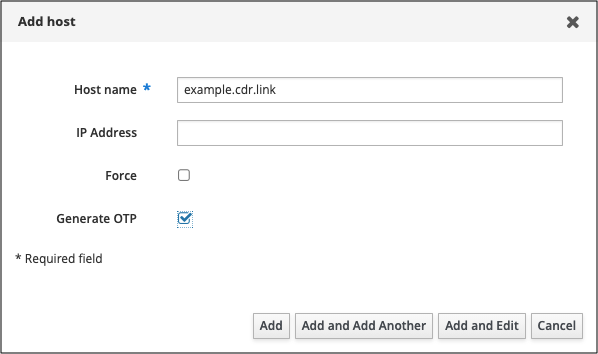
- Click Add at the top of the hosts list
- Enter the name of the new host, e.g.
example.cdr.link - The IP address will be automatically resolved from DNS, you can leave this blank but may need to allow a moment for the authoritative DNS servers to update
- Activate the Generate OTP checkbox
- Click Add to add the new host
- Save the generated OTP for later
User Setup
Create the Service User
This is the user on the host that will run the Podman containers.
- Open the Identity tab, and select the Users subtab
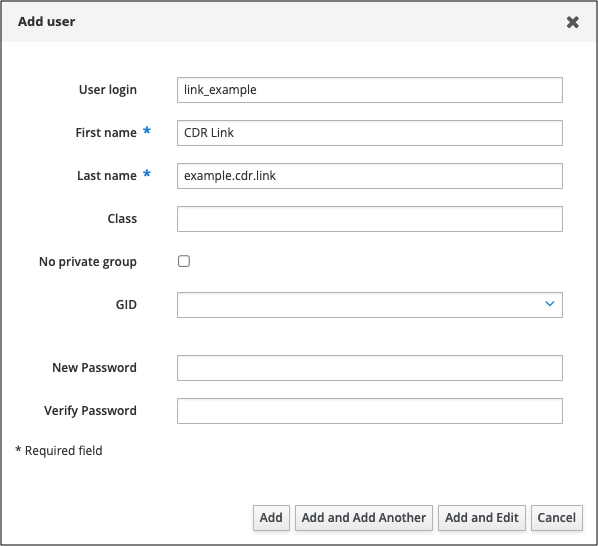
- Click Add at the top of the users list
- Enter a Username, we prefix all our Link service users with
link_for easy identification - Enter a First Name and Last Name, these values do not matter but the LDAP schema requires them
- Do not enter a New Password as this user will never need to authenticate with a password
- Click Add
Generate subordinate IDs for the user
- Open the Identity tab, and expand the Subordinate IDs subtab
- Choose the Subordinate IDs option from the drop-down menu
- Click the Add button in the upper-right corner of the interface
- In the Add subid window, select the user you have just created as the Owner
- Click Add
The range is automatically generated and managed by Identity Management.
tip
If you are not using our baseline Ansible role, ensure that the with-subid feature of the sssd authselect profile is
enabled to allow hosts to look up subids in LDAP.